
 Hyundai Elantra: ADVANCED Menu
After pressing the SETUPbutton, select “Phone� menu. while in PHONE menu, select the “Advanced� menu to make Bluetooth® Phone settings.
(The ADVANCED menu may differ according to audio specifications.)
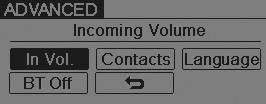
Incoming Volume (Bluetooth® call volume adjustments)
While in ADVANCED menu, select “In Vol.� Use the knob key to set the desired volume and press the ENTER button.
Contacts Sync (Automatic Phonebook download setting)
While in ADVANCED menu, select “Contacts� To automatically save the contacts and call history in your mobile phone each time you connect a mobile device, select ON. If you do not wish for automatic download, select OFF.
It’s not available to make a phone call by bluetooth audio system while the phonebook is being downloaded.
Language of Bluetooth® voice recognition
While in ADVANCED menu, press “Language�. To change the language, select the desired language and press the ENTER button.
Bluetooth® system off
While in ADVANCED menu, select “BT Off� to turn off the Bluetooth® System.


